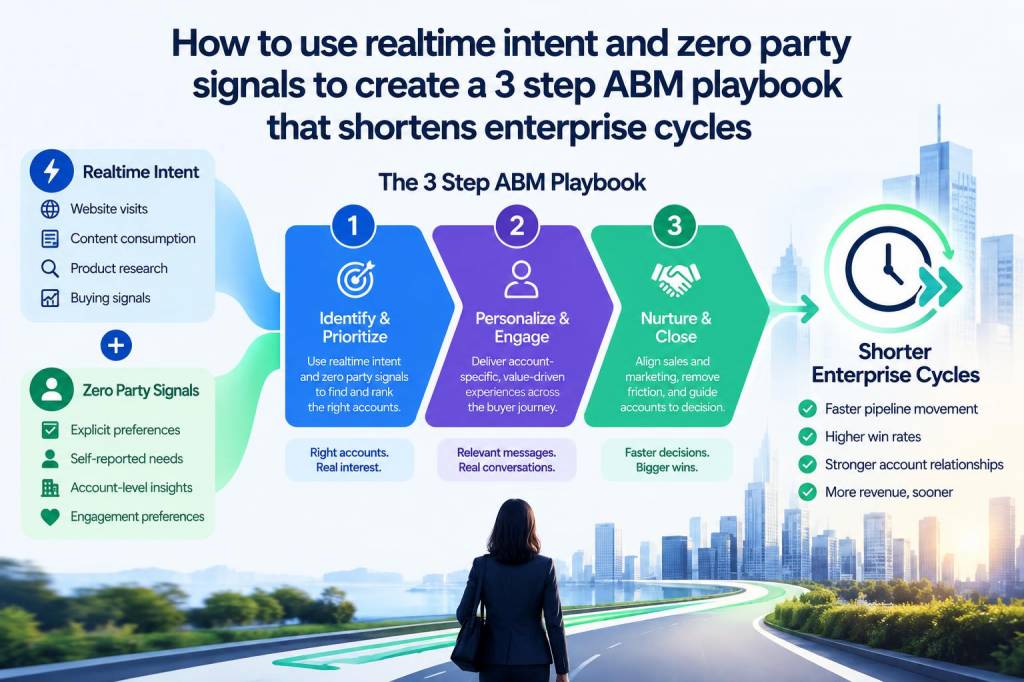
I’ve spent years refining Account-Based Marketing (ABM) strategies across complex enterprise accounts, and one truth keeps resurfacing: the faster you can convert intent into a relevant, timely action, the shorter the sales cycle becomes. In practice, that means two things—capturing realtime intent and harvesting zero-party signals—and then turning those signals into a simple, repeatable playbook. Below I share a practical 3-step ABM playbook I use to accelerate enterprise deals, with concrete examples and tools that have worked for me.
Why realtime intent and zero-party signals matter now
Enterprises move slowly for good reasons—procurement, legal, integration planning—but that doesn’t mean the buying interest doesn’t appear quickly. Realtime intent (what an account is doing right now across the web) and zero-party signals (what the account willingly tells you) together give you a near-crystal-ball view of who is ready to engage and what they care about. Combining both reduces guesswork and prevents the classic "spray and pray" ABM mistake.
Realtime intent examples: concurrent visits to product comparison pages, sudden spikes in searches for a specific feature, or increased consumption of content around a compliance need. These are often captured by intent platforms like Bombora, 6sense, or G2 Track.
Zero-party signals examples: explicit survey responses, preference settings in an account portal, meeting agenda topics suggested by stakeholders, or answers given in a demo form. These signals are gold because they come directly from the buyer and reduce interpretation risk.
My 3-step ABM playbook to shorten enterprise cycles
The playbook is intentionally simple so sales and marketing can adopt it without heavy change management. It revolves around detecting intent, enriching with zero-party inputs, and activating hyper-targeted engagement.
First, you need a reliable source of realtime intent. For me, that’s usually a mix: an intent data provider (Bombora, 6sense, G2), web analytics (GA4, server-side logs), and account-level behavior from marketing automation (HubSpot, Marketo) or product telemetry if you offer a trial.
Key actions I take:
In practice, I use a lightweight rules engine in Zapier or native workflows in 6sense to push high-priority events into Salesforce with a clear play tag. This preserves speed—alerts that arrive in the middle of a buying window must be acted on within hours, not days.
Once an account surfaces intent, the objective is to convert passive interest into explicit preferences. I often embed a very short set of micro-conversions that feel natural to the buyer:
These methods are non-intrusive and respect enterprise buyers who dislike lengthy forms. The goal is to capture the minimum viable preference data that meaningfully tailors outreach.
Tools I’ve used: Typeform for quick surveys (great UX), Chili Piper/Calendly with custom form questions, and product hooks via Intercom or Pendo for in-app signals. All of these push back into your CRM as structured fields.
The most critical element: speed and relevance. I define a 72-hour window from detection to a fully personalized engagement sequence. That sequence generally looks like this:
For enterprise deals, bringing in technical credibility early (within 72 hours) reduces friction in later procurement conversations. I schedule a short technical alignment call before any deep commercial talks to create mutual confidence in the solution fit.
Operational tips to make this playbook realistic
Implementing this at scale requires three operational commitments:
Examples and signal mapping
| Signal type | What it implies | Immediate action |
|---|---|---|
| Intent spike on vendor comparisons (Bombora/G2) | Shortlist/in-evaluation | Immediate SDR outreach + tailored one-pager |
| Trial user opens security docs | Technical evaluation, potential blocker | Offer technical session with architect within 48 hours |
| Survey: “Priority = Cost reduction” (zero-party) | Buying criteria | Send ROI case studies and pricing modeling |
Objections you’ll hear (and how I handle them)
“This feels intrusive.” I respond by being transparent: we only ask one or two questions and give clear value in exchange—relevant content or a tailored technical session. Enterprise buyers appreciate relevance and time-saving more than formality.
“We don’t have the data architecture.” Start small: even a Slack channel receiving intent alerts and a shared Notion content kit can move the needle. Upgrade to native workflows in your CRM as you mature.
“Sales won’t act fast.” Tie intent response SLAs to performance metrics and incentivize early technical alignment calls. For large accounts, create a dedicated rapid-response pod (SDR + AE + Solutions Engineer) focused on intent-driven opportunities.
When I stitch realtime intent and zero-party signals into one repeatable workflow, enterprise cycles contract not because procurement speeds up, but because buyer certainty does. The buyer arrives to procurement with a clearer view of fit, budget, and timeline—and that’s where the real time savings happen.